


PennyGems: Screen Penny Stocks
4.875.00 Reviews
App Specs
- Version
- 7.2.6
- Updated On
- License
- Free
- Downloads
- 50,000+
- Developer
- Stockring, Inc.
- Categories
- Finance
- Platform
- Android
Screenshots
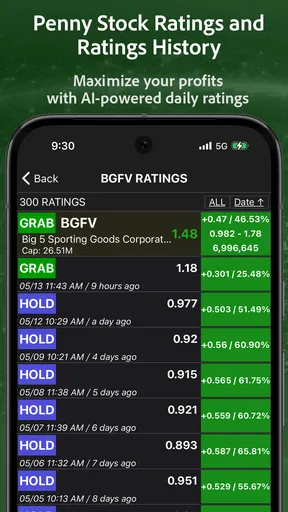
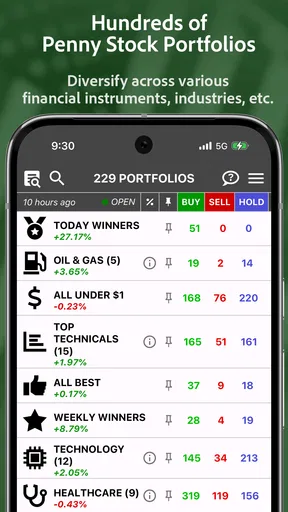
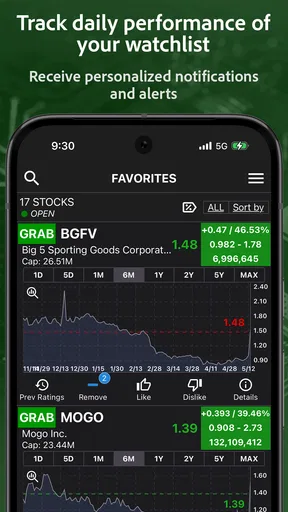
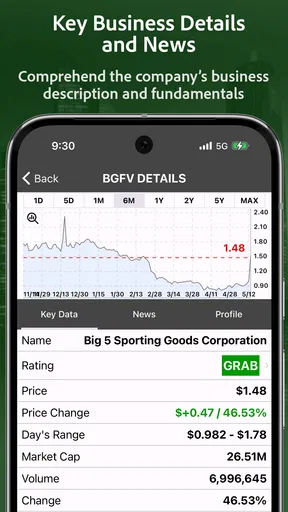
 Analysis by AppCompare
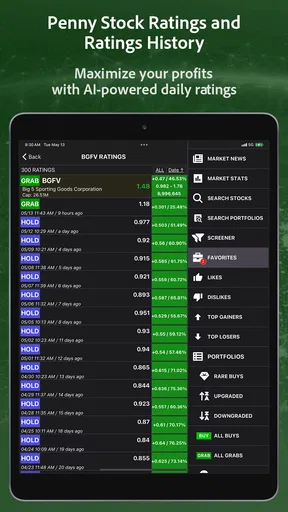
I approached PennyGems as a focused finance app rather than a complete investing platform. Its central idea is simple: use AI-based buy and sell signals to help identify interesting penny stocks, then use price alerts to avoid watching the market every minute. In my experience, that narrow focus is both its strongest quality and the main reason some investors will outgrow it quickly.
The app is free to install, and Stockring, Inc. presents it for an Everyone audience. It has built a small but active user base, with more than 50 thousand installs, a 4.8 average from roughly 364 ratings, and 75 written reviews. Those figures suggest that many users find the concept useful, but they should not be confused with proof that its signals will produce gains. Penny stocks remain volatile, and no alert or algorithm removes the possibility of losing money.
What the signal-focused approach actually changes
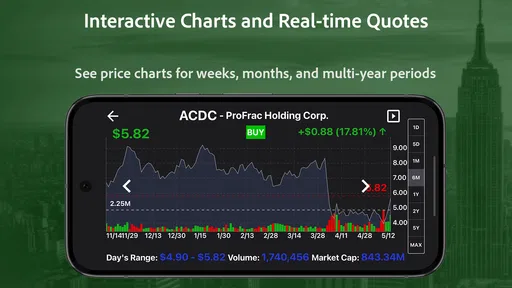
The most important capability here is not simply displaying stock prices. It is the attempt to turn a large, noisy part of the market into a shorter list of possible opportunities. Instead of manually searching through unfamiliar low-priced companies, I can use the app as a screening companion and pay attention when a stock reaches a level that matters to me.
That distinction matters because penny-stock research can become exhausting very quickly. A normal brokerage app is usually better for placing orders, reviewing account balances, and checking established holdings. A general market-news app may offer headlines and charts across the entire market. PennyGems is more specialized: it is designed around discovery, signals, and alerts for users who are specifically interested in smaller, more speculative stocks.
I would not treat the word “AI” as a guarantee of superior judgment. In practical use, an automated signal is best understood as a prompt to investigate, not as a command to buy or sell. The useful question is not “Did the app tell me to enter?” but “What changed, and is the reason strong enough for me to accept the risk?” That mindset keeps the feature in its proper role.
The app’s price-alert angle can be just as valuable as the signals themselves. A signal may attract attention, but an alert can help turn that attention into a personal plan. For example, I might decide that a stock is worth watching only if it reaches a certain price, or I might want to know when a move has become large enough to review my position. This is more disciplined than repeatedly opening a chart and reacting to every small movement.
Using the app as a discovery layer
My preferred workflow would be to use PennyGems at the beginning of research, not at the end. I would first review the stocks it brings to my attention, then check the company through a brokerage account or another research source before making any decision. That separation is important because a screening tool can help with attention, while a broker and primary company information are better suited to execution and deeper verification.
Worth Reading Before You Choose

EA SPORTS FC Mobile 26 Is a Bigger Football Game, but It Takes Time

Flipboard Shows What News Apps Must Do Beyond the Feed

Switching to Android Auto Means Rethinking Your Driving Routine

Google Calendar Makes a Crowded Week Easier to Manage

Ludo King Makes the Most of the Minutes Between Plans

Baby Panda World Brings Quick Play to Modern Phones, but Its Game Library Feels Busy
A useful habit is to write down the reason for following a stock before setting an alert. It might be a planned entry range, a level that would invalidate the idea, or a reminder to inspect unusual movement. This prevents the alert from becoming an emotional trigger. Without a written plan, a notification can encourage chasing a price that has already moved too far.
Another practical point is that penny stocks often have wider spreads and thinner trading activity than larger companies. An alert may arrive at a convenient moment, but the price shown may not be the price at which an order is realistically filled. I would therefore use the notification to open the market data and inspect the current situation, rather than assuming that the alert itself represents an executable opportunity.
A realistic day-to-day example
Imagine I have a short list of speculative companies and only a limited amount of time before work. Instead of scanning every ticker during breakfast, I can use the app to surface possible movements and set alerts around the few names I have already researched. If one notification arrives, I can review the chart, compare the current price with my notes, and decide whether the event deserves further attention.
If the price has already jumped sharply, I may do nothing. That is an important benefit of an alert-based workflow: it gives me a moment to pause rather than forcing me to act immediately. If the movement fits my original plan, I can continue the review through my usual brokerage app. If it does not, I can dismiss it and preserve my capital for a better opportunity.
This approach is especially helpful for someone who wants to monitor speculative stocks without keeping a live market screen open all day. It does not eliminate research, but it can reduce the repetitive task of searching for movement manually. The time saved is most useful when it is spent on checking the company, liquidity, recent filings, and the reason behind the price action.
Where the experience has friction
The narrow focus can make the app feel less suitable for investors who want one place to manage everything. I would not choose it as my only finance app if I needed portfolio accounting, order execution, broad asset allocation tools, retirement planning, or detailed company research. Its value is more complementary: it can help identify and monitor ideas while another service handles the rest of the investing process.
The signal itself also needs interpretation. Automated systems can react to patterns that look meaningful but do not explain the full story. A sudden move could reflect news, low liquidity, a temporary burst of attention, or a reversal waiting to happen. A buy or sell indication does not tell me how much money to risk, how long to hold, or whether the underlying company fits my goals.
There is also a psychological trade-off. Notifications can make a user feel more informed while encouraging more frequent decisions. That is not always an advantage. If I receive several alerts and start treating every one as urgent, the app can increase impulsive trading instead of improving discipline. I would keep notifications limited to stocks I have already researched and avoid building a watchlist so large that every market move feels important.
The free entry point is appealing, but the app includes in-app purchases ranging from $7.99 to $79.99 per item. That makes it important to understand what I am paying for before upgrading. I would begin with the free experience, decide whether the signals and alerts fit my routine, and only then consider spending money. A paid feature is worthwhile only if it improves a process I already use consistently; it should not be treated as a shortcut to reliable returns.
How it compares with ordinary alternatives
A conventional brokerage app is usually the better choice when the main goal is buying and selling securities, reviewing positions, or keeping track of cash. It may also offer broader market information and account tools. PennyGems has a different emphasis, placing the spotlight on penny-stock discovery and alert-driven monitoring rather than acting as a full financial home.
A broad investing-news app can be preferable for users who want economic coverage, company reporting, analyst commentary, and education across many asset classes. PennyGems is more concentrated. That concentration may make it easier to focus on speculative small-cap ideas, but it also means the app is not the natural choice for someone whose portfolio is mostly index funds, bonds, or large established companies.
Manual screening through a charting platform can provide more control. Experienced traders may prefer to define their own filters, inspect volume and price behavior directly, and build a system they understand from the ground up. PennyGems is more convenient for users who want a ready-made signal layer, but convenience comes with less transparency than constructing every screening rule personally.
For me, the best comparison is not “which app replaces the others?” but “which part of the process does each app handle?” PennyGems can help with attention and timing. A broker can handle execution. A research source can help verify the business. A spreadsheet or journal can record the plan and the result. Combining those roles is safer than expecting one signal screen to perform all of them.
Small habits that make the alerts more useful
First, I would separate discovery from commitment. When a signal appears, I would add the stock to a review list rather than immediately placing an order. This simple delay protects against buying after a fast spike and gives me time to check whether the movement matches a reason I understand.
Second, I would use alerts as checkpoints, not predictions. A price notification tells me that a condition deserves attention; it does not tell me what will happen next. I would decide in advance what information I need to see before taking action, such as whether the move is supported by a credible development or whether the spread makes the trade impractical.
Third, I would keep position size separate from confidence in the signal. Even a signal that looks convincing can fail, particularly in a volatile corner of the market. Risk limits should come from my overall financial situation and tolerance for loss, not from how persuasive an app notification feels.
Fourth, I would review alerts after the fact. A short journal entry noting why I acted, why I passed, and what happened later can show whether the tool is genuinely improving decisions. This is more informative than judging the app after one successful or unsuccessful trade. It also helps reveal whether I am following a plan or simply reacting to notifications.
Who will get the most from PennyGems
I think the app is best for a curious investor who already understands that penny stocks are speculative and wants help narrowing the field. It can also suit a part-time market watcher who cannot continuously scan charts but still wants notifications tied to selected opportunities. The free starting point makes experimentation easier, while the current version, 7.2.6, gives users a defined product to evaluate rather than an abandoned-looking tool.
It may also help someone who has a clear watchlist but struggles with follow-up. In that case, the value is not only finding a ticker. The alert can create a repeatable routine: review the notification, compare it with the original thesis, check the trade conditions, and either act through a separate broker or move on. That structure is more valuable than simply receiving more market noise.
I would recommend skipping it if you want passive investing, long-term retirement planning, or a low-maintenance portfolio built around diversified funds. It is also a poor fit if you are likely to interpret every AI signal as financial advice or if a sudden loss would create serious financial pressure. The app’s subject matter demands patience, skepticism, and money that you can genuinely afford to put at risk.
Beginners can use it, but I would not make it their first and only introduction to investing. Before relying on the signals, a new investor should understand basic order types, liquidity, volatility, diversification, and the difference between a company’s share price and the quality of its business. Without that foundation, a clean interface and a confident-looking notification can create more certainty than the situation deserves.
My closing view
PennyGems is most convincing when I treat it as a focused assistant for finding and monitoring penny-stock ideas. Its AI buy and sell signals can reduce the amount of manual searching, while price alerts can make a watchlist more manageable. The practical advantage is not that the app predicts the market perfectly; it is that it can help me decide where to spend my limited attention.
That benefit comes with clear boundaries. I still need independent research, a separate route for execution, and a risk plan that exists before the notification arrives. The in-app purchase range also means I would test the free experience carefully rather than assuming that a paid option will improve results. A signal can organize my next question, but it cannot answer every important question about a trade.
Overall, I see PennyGems as a useful companion for a specific kind of investor: someone who wants a more directed way to watch speculative stocks and is willing to do the responsible work afterward. Its real strength is attention management, not guaranteed prediction. If that is the gap in your current routine, it is worth trying. If what you need is a complete brokerage, a diversified investing plan, or calm long-term portfolio management, another type of finance app will serve you better.
Pros
- Simple interface makes penny-stock screening easy for beginners.
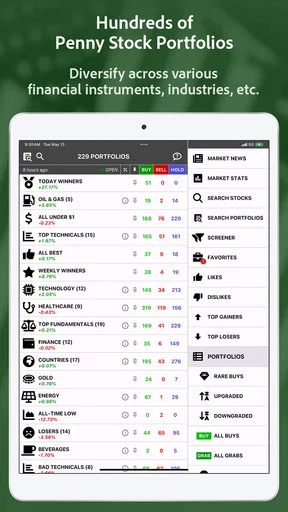
- Useful filters help narrow down potentially interesting low-priced stocks.
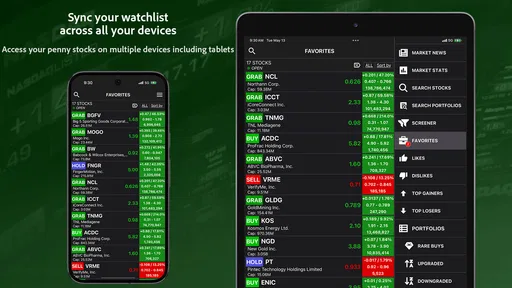
- Watchlists make it convenient to monitor selected companies over time.
- Quick access to market data supports fast research on mobile.
- Can help discover lesser-known stocks beyond large-cap companies.
Cons
- Penny stocks can involve extreme volatility and substantial losses.
- Data or quotes may be delayed depending on the selected market.
- Limited company information may require research in other finance apps.
- Some features or data could be restricted behind in-app purchases.
- Availability and liquidity of listed stocks may vary by exchange.
FAQs for PennyGems: Screen Penny Stocks
What is PennyGems: Screen Penny Stocks used for?
PennyGems: Screen Penny Stocks is designed to help users discover and filter low-priced stocks using customizable screening tools. It can be useful for investors who want to research penny stocks by reviewing market data, price movements, trading activity, and other available indicators. The app is primarily a research and discovery tool, not a guarantee of profitable investments or personalized financial advice.
Is PennyGems: Screen Penny Stocks suitable for beginners?
The app can be helpful for beginners who are learning how penny-stock screening works, especially because it brings multiple stock filters and market details into one place. However, new investors should understand that penny stocks are often highly volatile, less liquid, and more speculative than established companies. Before relying on the app, users should learn basic investing concepts and independently verify important information.
Can I buy or sell stocks directly through PennyGems: Screen Penny Stocks?
PennyGems: Screen Penny Stocks should generally be viewed as a stock-screening and research application rather than a complete brokerage platform. Whether trading is available depends on the app’s current features and any supported integrations, so users should check the latest listing and in-app information before downloading. You may need a separate brokerage account to place orders, manage investments, and access full trading functionality.
How reliable and current is the stock information in the app?
The usefulness of PennyGems depends heavily on the quality, coverage, and timing of its market data. Some information may be delayed, limited to selected exchanges, or affected by data-provider updates and technical interruptions. Users should treat the displayed figures as research references, confirm prices and company details through a trusted financial source, and avoid making urgent trading decisions based only on information shown in the app.
Are penny stocks found through PennyGems safe investments?
No stock-screening app can make penny stocks safe, and appearing in PennyGems does not mean that a company is financially strong or legitimate. Penny stocks may experience sharp price swings, low trading volume, limited public information, dilution, and higher exposure to promotional activity or fraud. Always research a company’s filings, business model, financial condition, and risks, and only invest money you can afford to lose.


